Adding bids to auction items – Manually adding a bid on a silent auction item
Once the bids have been added, to mark these a winner and send out a payment link follow the steps below:
To manually collect payments when items have closed simply:
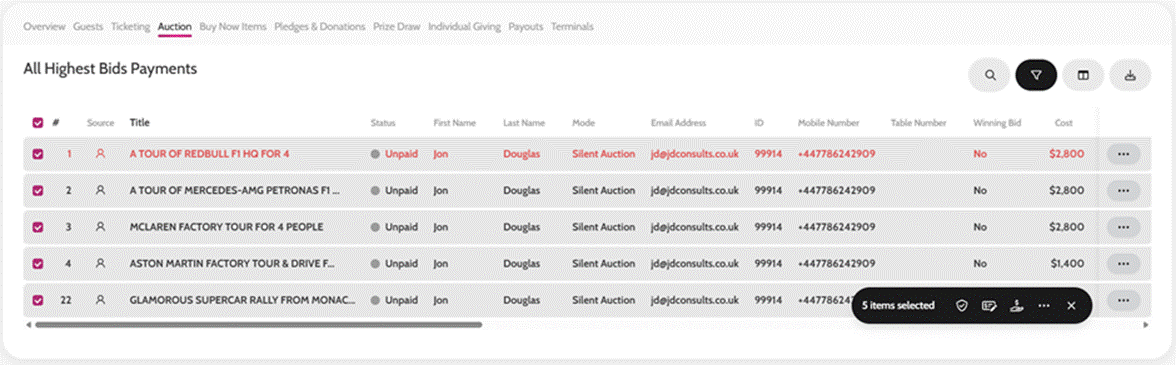
- Go to Payments > Auction
- Filter by All Highest Bids
- Select the items you added the bids for
- Click Make Winner & Collect Payments
- This will then charge guests’ cards (if you have had pre-authorization of cards on) and send out the communication template ‘Auction Item Winner – Collect Payment’
- It takes 5 minutes for the system to process all payments, but you can see how this is progressing by refreshing the page, and once a payment is taken it will appear with a reference in the Ref column and status will change to Paid
To manually send payment links when items have closed simply:
- Go to Payments > Auction
- Filter by All Highest Bids
- Select the items you added the bids for
- Click Make Winner & Send Payment Link
- This will then send out the communication template ‘Auction Item Winner – Payment Link’ to your guests with a payment link to pay on
- You can see once a payment has been made as it will appear with a reference in the Ref column and the status will change to Paid
You can amend the Communication templates for Auction Item Winners beforehand if you wish to include instructions on how to collect their items or add a personal touch.
Make Winner